Labor cost visibility for finance leaders

Turn work hours into finance-ready data. ClickTime gives finance leaders the labor cost visibility to allocate, budget, bill, and report with confidence.

Get a demo

Finance-ready labor data

Every hour is categorized by project, cost code, and billing status at point of entry

Audit-ready records

Built-in approvals and audit trails that stand up to scrutiny

Accounting system integration

Verified labor data flows directly into NetSuite, Sage Intacct, and SAP

Stop allocating labor costs from estimates and spreadsheets

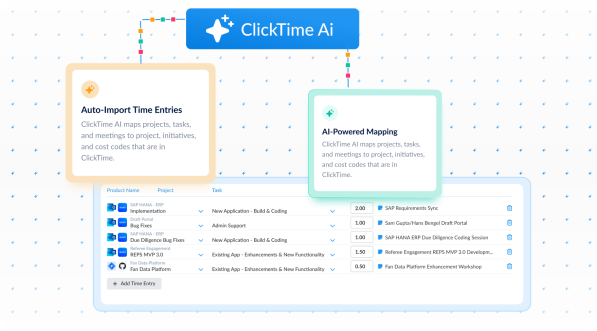
  • Capture costs at the source: ClickTime reads your team's connetected project management tools, calendars, Google and Microsoft apps, and meeting platforms like Zoom—then optional AI maps that activity into the project and cost codes finance needs for allocation, CapEx and OpEx classification, and R&D tracking
  • Eliminate manual reclassification: Hours arrive pre-categorized by billable status, department, cost center, and GL code so finance doesn't rebuild the data after the fact
  • Replace leadership estimates with actuals: Over half of organizations rely on manager guesses for labor allocation—ClickTime gives you verified, employee-reported hours tied to real work
Measure labor costs against billable hour budgets to protect margins

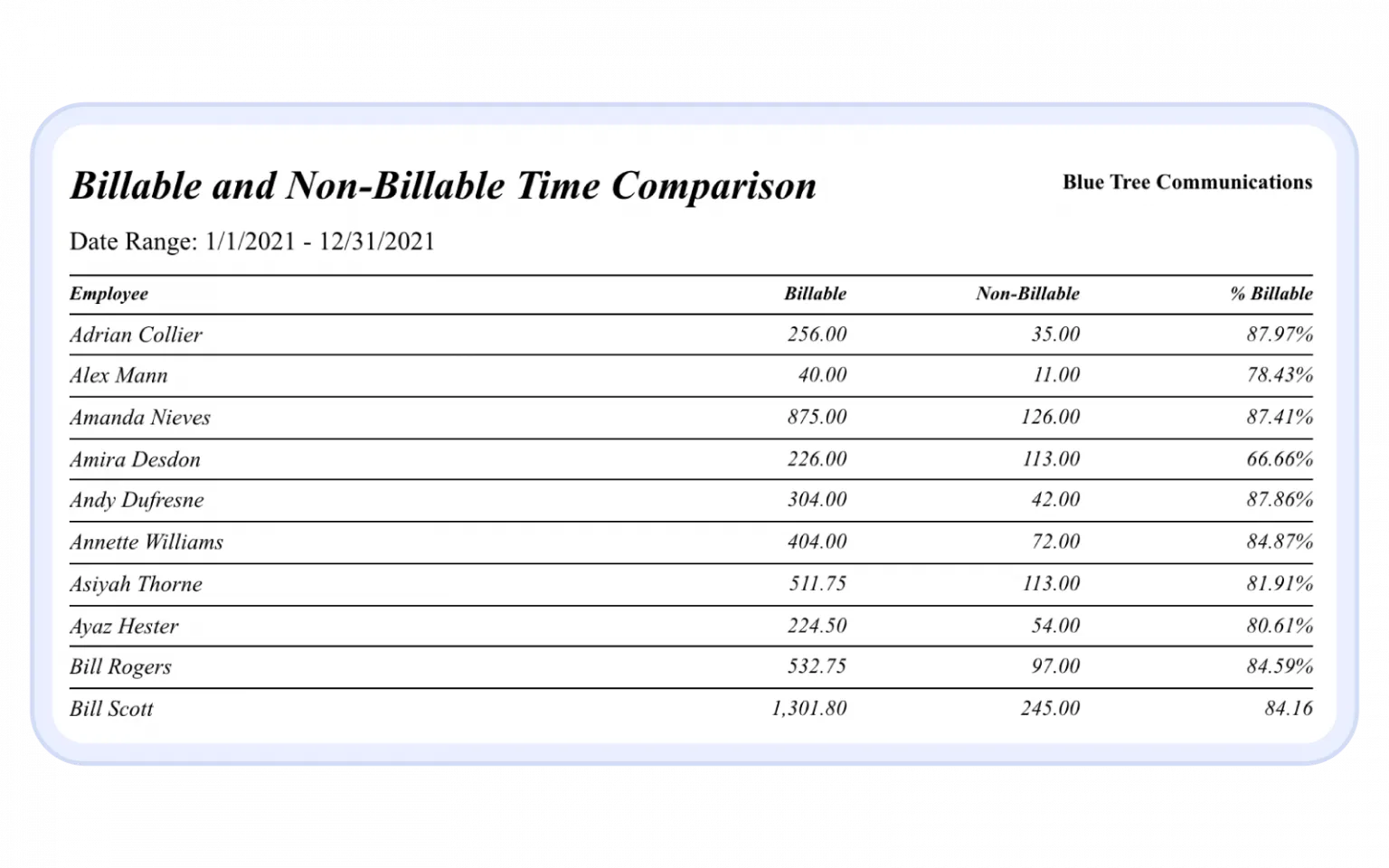
  • Track cost and revenue side by side: Labor cost budgets show actual spend against billable hour targets for every project, so professional services teams can monitor and hit their target margins before the invoice goes out
  • Spot margin erosion early: Real-time visibility into project profitability, utilization rates, and work-in-progress lets managers course-correct before a project becomes unprofitable—50.1% of finance leaders have experienced budget overruns from improper labor cost tracking
  • Set and track billing targets: Establish billable hour goals by employee and team, then measure actual performance against those targets to recover revenue leakage across the portfolio

Feed verified labor data into the systems finance already uses

  • Map directly to your general ledger: ClickTime's NetSuite, Sage Intacct, and SAP integrations move approved timesheet data into your accounting system—structured by cost code, project, and billing rate—without re-entry
  • Apply variable cost rates per pay period: Calculate the hourly cost of salaried employees based on actual hours worked each period, so labor cost allocation reflects real expense rather than flat averages
  • Account for overtime accurately: Use preset or custom overtime rules to capture true nonexempt employee costs, giving finance the actual labor figures they need for project costing and reporting
Integrations

Purpose-built for accurate time data capture

View all integrations

Every entry includes approval workflows, complete change history, and instant reporting. Whether it's R&D tax credits, client billing disputes, or grant compliance, you have defensible records without scrambling through spreadsheets or Jira logs.

ClickTime AI
ClickTime AI
ClickTime AI
ClickTime AI
ClickTime AI
ClickTime AI
Integrations

Connect ClickTime to your accounting and ERP systems

View all integrations

ClickTime connects to your invoicing and financial systems so verified, approved hours flow directly into your billing workflow — no manual re-entry, no reconciliation before the invoice goes out. Every entry includes a complete approval history and change log, so when a client questions a charge, you have the record to back it up.

ClickTime AI
ClickTime AI
ClickTime AI
ClickTime AI

Solution FAQs

Why is automated labor cost allocation important?

Most organizations allocate labor costs using spreadsheets and manager estimates—methods that are slow, error-prone, and impossible to audit. Automated labor cost allocation captures hours against pre-defined cost codes at the point of entry, so finance gets verified actuals instead of reconstructed guesses. This reduces budget variance, supports audit readiness, and gives leaders the data they need to make allocation decisions with confidence.

What are the main types of labor cost allocation?

Labor costs are typically allocated by project, department, cost center, or funding source. Organizations also classify labor as direct vs. indirect, billable vs. non-billable, and CapEx vs. OpEx. ClickTime supports all of these allocation methods by letting finance define the cost structure upfront, so every hour employees log is categorized correctly from the start—no reclassification needed.

How does ClickTime allocate costs to labor hours?

ClickTime ties each hour to meaningful financial categories—project, cost code, billing status, and department—at the moment of time entry. Variable cost rates calculate each salaried employee's true hourly cost per pay period based on actual hours worked. Custom overtime rules capture accurate nonexempt costs. The result is finance-ready labor data that maps directly to your general ledger without manual rework.

Can ClickTime integrate with NetSuite, Sage Intacct, or SAP for project accounting?

Yes. ClickTime integrates with NetSuite, Sage Intacct, and SAP to move approved, categorized labor cost data directly into your accounting system. Time entries are structured by cost code, project, and billing rate so they map to your GL entries without re-entry—giving finance teams a single source of truth for project costing and labor cost reporting.

Stop losing visibility into your largest expense

Book a demo
Ask a question